You're viewing the previous version. For the current product, see the v3 documentation.
Challenges
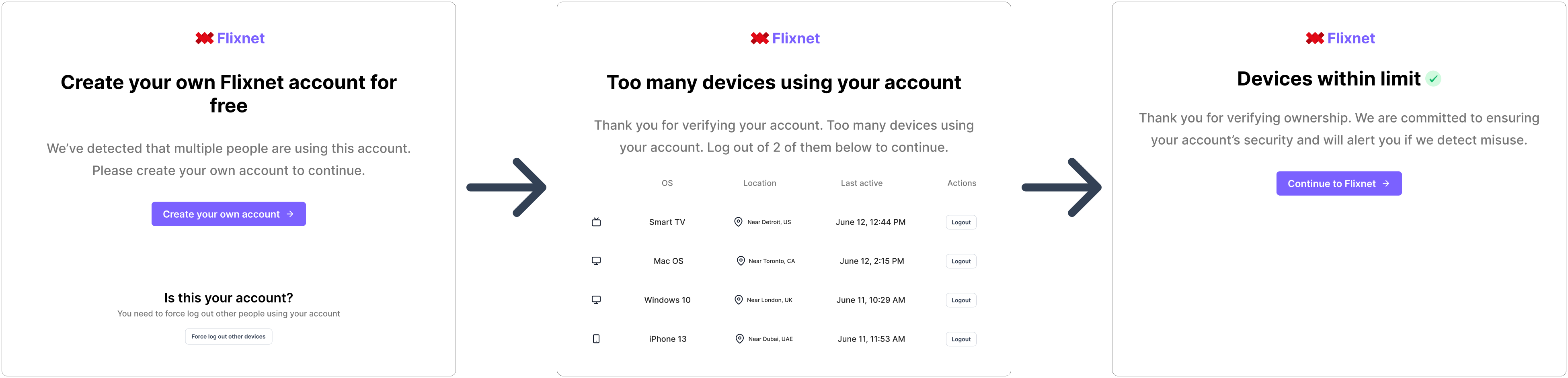
A challenge occurs when Rupt detects that an account is being used by more people than allowed. When this happens, Rupt will ask the person to create their own account and log out of this one (the one they are sharing). See how account sharing prevention works. This process is what we refer to as a challenge.
Challenges allow users to claim that they are the account owner and kick out other people using their account. This is done by verifying their email or phone number. Once they verify their email or phone number, they can log in to their account and kick out other people using their account. To trigger this verification, you need to provide the email and phone fields when calling the attach function. See how to attach a device.
const { device_id } = await Rupt.attach({
  client_id: "client_id",
  account: "account_id",
  email: "user_email", // Optional
  phone: "user_phone", // Optional
  redirect_urls: {
    logout_url: "https://your-logout-url.com",
    new_account_url: "https://your-create-new-account-url.com",
  },
});
Using the above sample code, the challenge journey looks like this:

If neither email nor phone is provided, the verification step will be skipped and any person using the account can kick out other users and devices.
We recommend including the email and phone parameters in the attach call because it adds friction to sharing and ensures that only owners (or with their permission) is the account being shared. This has been proven to increase conversion rates.
For more information on challenges, see the challenges documentation.