Risks
A risk is Rupt's read on what an evaluation looks like (this smells like account takeover, this looks like a fake account), each scored on its own and graded by severity. A risk never dictates the verdict on its own. It's a summary, and your policies decide what to do with it.
How a risk is scored
Risks are built from the ground up:
- Signals are the raw measurements Rupt collects from the user's environment.
- Checks turn those signals into specific facts: is this IP a VPN, has this user moved impossibly far since last seen.
- A risk takes the checks that predict it, weights each by how much it counts, and adds them up.
That weighted total is the score, and each risk maps its score to one of four severities: low, medium, high, or maximum.
The cutoffs aren't shared across risks. Each risk sets its own, because the same check can carry very different weight depending on what you're detecting: a score one risk treats as high might still be medium for another. Severity also depends on how the checks combine, not just how many fire: for account sharing, concurrent sessions and impossible travel together rank far higher than either alone, while a modest device count on its own stays low.
The severities surface in the risks array on the evaluation. Read it in your own logic, or write a policy that matches on the risk itself: the risk condition fires when a risk was raised, and risk_severity fires once it reaches a severity you choose. The checks behind a risk stay available for finer rules.
Standard risks
Rupt ships with a standard set of risks out of the box, and the list grows as the fraud landscape shifts. You don't configure anything to get them. Most are scored for your policies to act on directly; a few Rupt only records for visibility.
Acted on by policies
Each of these is scored so your policies can match it directly, weighting every check by how strongly it predicts the risk.
- Account takeover (
ato): someone other than the owner is signing in. Leans on a new fingerprint, a new IP, impossible travel, and anonymizing networks. - Fake account (
fake_account): the signup probably isn't a real person. Driven by email quality: disposable, invalid, unverified, or webmail. - Account sharing (
account_sharing): one account, several people. Shows up as concurrent sessions, impossible travel, and a pile of devices on one account. - Scraping (
scraping): automated extraction rather than a human. Flagged by anonymizing networks and high velocity. - Linked accounts (
linked_accounts): separate accounts sharing the same fingerprint or IP. Catches multi-accounting and ban evasion.
Recorded for visibility
Rupt scores these on every evaluation but doesn't act on them by default. They surface in the dashboard so you can keep an eye on them.
bot: automated, non-human traffic. See Bots.tampering: the client environment has been modified to lie about itself.anti_fingerprinting: the user is running tooling built to defeat fingerprinting, like Tor Browser, Brave farbling, or Firefox RFP.incognito: the session is in private browsing mode.replay_attack: a captured evaluation is being replayed instead of run fresh.
Custom risks
You can define your own risks in the dashboard, on the same machinery the built-in ones run on. Since a risk is a weighted set of indicators (the specific facts Rupt derives from signals), building one is a matter of naming it, picking when it should be evaluated, and choosing which indicators count and by how much.
Open Risks in the dashboard and click New risk. You get a canvas with three parts:
- Trigger: the actions the risk is evaluated on. Pick the built-in
login,signup, andaccess, type any custom action you send Rupt, or run it on every action. - Indicators: the indicators that predict the risk, each with a point weight. You're choosing from the same indicators Rupt already collects, so a custom risk starts scoring the moment you save it. There's nothing new to wire up.
- Risk score: a preview of the most a matching evaluation can score, and the severity it maps to. Scores follow the same cutoffs as everywhere else:
3+is medium,5+is high,7+is maximum.
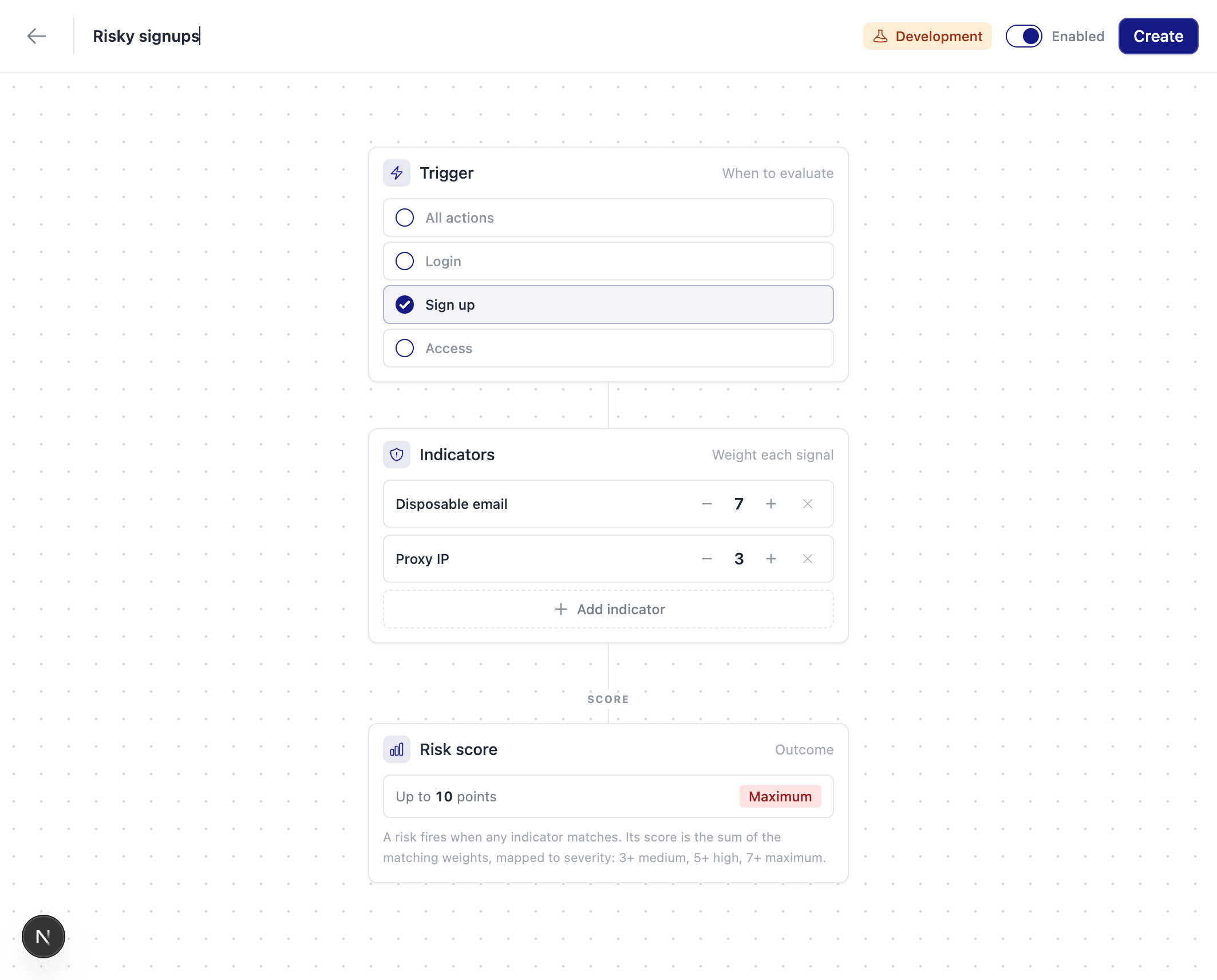
A custom risk scores on every matching evaluation and appears in the risks array like any other, so you can read it in your own logic or write a policy over the checks behind it. That lets you target whatever's specific to your business: fraudulent listings, low-intent leads, payout abuse, and the like.
Custom risks are built from the indicators Rupt already ships. If you need a signal Rupt doesn't collect yet, let us know and we'll look at adding it.
Where risks fit
- Need help? Contact support.
- Want to see Rupt in action? Request a demo.
- Questions? Talk to sales.
- Check out our changelog.
- Check our status page.
- LLM? Read llms.txt.